FEP 2018: Elected Areas – Professional Development & Research Projects
In addition to an assessment of these “3 REQUIRED AREAS” (RFP Section 3.5.3.1.) , “AT LEAST TWO ELECTED AREAS” (RFP Section 3.5.3.2.), and other “RELATED AREAS” (REP Section 3.5.3.3.) may also be selected by the faculty member to review, in order to bring into better focus their full professional involvements at the college or within the District. Examples include program coordination, research projects, department/division chair responsibilities, student activities-advising/mentoring, professional involvement in the community, professional growth, involvement/projects, professional interaction with colleagues, etc.
- AT LEAST TWO ELECTED AREAS:
- Professional Development &
- Professional Interaction with Colleagues
- RELATED AREAS:
- Involvement/Projects
I could easily write a post about my involvement in our MCLI Grant: Analytics for English Faculty Learning Community and our subsequent research study, Using Data to Improve Student Success in eCourses, but that would be too easy, and I’m not ready to reflect on that yet. So instead I’m going to reflect on my professional development and my professional interactions with colleagues in coordinating this year’s TYCA West conference at Glendale Community College.
 This was the first time GCC has hosted the annual TYCA West conference that routinely rotates between Arizona, Utah, and Nevada. I bravely volunteered us while we were in Salt Lake City for the 2016 conference, so naturally, I would be in charge. This didn’t bother me, as I knew we had a great team here at GCC and we would have plenty of planning help. To toot my own horn, we pulled it off.
TYCA-West is the Two Year College English Association for the Western Region. TYCA-West functions under the umbrella of the parent organization, National TYCA. National TYCA is part of NCTE (National Council of Teachers of English). Within National TYCA there are seven regions. TYCA-West serves faculty in Utah, Idaho, Wyoming, Arizona, Nevada, and Hawaii.
I’ve been a member of the TYCA-West Executive Committee for eight years as the webmaster, which sounds way more impressive than it really is. I designed the site, which runs on WordPress, and then helped keep it up-to-date. After this last year, I passed the torch and am no longer part of the committee. That’s just one of many commitments I’ve given up after this year.
It was a great experience working with my colleagues to put this conference together. It was one of the biggest TYCA West conferences to date with over 150 participants. We had about 15 faculty from the department helping, and I was surprised that our Reading faculty, who are part of our department of 40, chipped in to help, presented and attended the conference. I’d never organized anything this big before, but my best decision was getting taskmaster, Beth Eyres, involved. “Chop, chop!” Truth be told, she really did all the work. Ha! At least the making sure it all got done part.
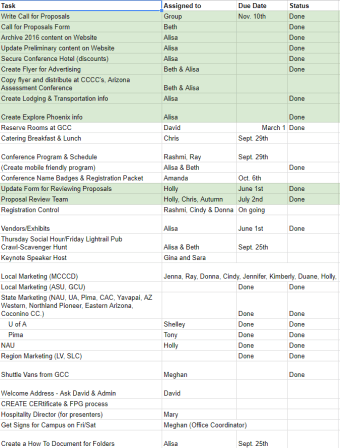 We started with a list of things that needed to be done. I was amazed at how long that list was. Then we asked for volunteers to pick just one task. When you have a department of 40, you can spread it out like that if people are willing to help. And willing they were. I was surprised by how into it people got. Ray Lira was my favorite. He and Rashmi designed and printed the program, and he was so excited about it. It turned out really good too.
These are the professional interactions with colleagues that I came to GCC for and they delivered for this project and every day since I got here. It’s great to be able to work with a team to accomplish something big.
The conference had a great theme and keynote speaker thanks to Shelley Rodrigo, GCC adjunct and Assistant Professor in the Department of English at the University of Arizona. She came up with the idea the same day we volunteered to host.
The theme for our 2017 conference was “The Measure of Tomorrow: Assessment through the Lens of Race, Diversity, & Inclusion. “Community colleges serve some of the most at-risk students. Nearly half of all students enrolled in higher education in the United States are enrolled in two-year colleges. Nationally, 58% of two-year college students receive aid, while 72% apply. Demographically, two-year college students are widely diverse in age, race, ethnicity, and income-status (American Association of Community Colleges).
Race, gender and class shape the experience of all people. Therefore it is natural to agree that this should be considered when developing assessments in education, as well as the importance of infusing culturally relevant pedagogy into the academic curriculum. And in so doing, faculty today must consider alternative assessment methods that include strategies of assessment that could be put into practice to include, rather than exclude, students in order to serve more diverse learners.
Shelley also suggested that we invite Dr. Asao Inoue, Professor and Writing Center Director at the University of Washington, Tacoma to be our keynote. His provocative talk was interesting and created an opportunity for great dialogue and set the stage for a great conference.
The breakout sessions were great and the conference was well attended. We set out with a goal to make it the best TYCA West conference yet, and I think we succeeded. It was one of the largest, if not the largest in attendance, and we added in a few modern upgrades: online conference schedule viewable on mobile, a Tweet Wall, CFP closed on time with no extension needed, and the first annual TYCA West Pub Crawl Scavenger Hunt using Goosechase.
FEP 2018: Instructional Delivery & Design Thoughts
To complete an FEP each faculty member must engage in a self-examination of “THREE REQUIRED AREAS”:
- TEACHING (OR OTHER PRIMARY DUTIES). For example, instructional or service delivery, content expertise, classroom or program management, instruction/program design. This year I decided to focus on instructional delivery and design.
I’ve written previously about a redesign of my hybrid ENG102 course, so I’m going to continue that discussion here with a focus on instructional delivery and design. One of the many things I wanted to focus on this semester was better instruction for my hybrid students. The current instruction and design wasn’t bad, but I wanted to see if I could make changes to improve it. With this in mind, I decided to focus on feedback in grading, more one-to-one interactions, and more engaging in-class instruction.
In the past I’ve always graded student work in a digital format, mostly using a tool built into the publisher software I’ve used for 8 years, Connect Composition. Connect is great in that it makes it easy for the instructor to type feedback on the essay, and it saves the responses so if you have to say the same thing (think: Run-on sentence) over and over again on every student’s paper, you only have to type the R and the phrase just pops up, you select it, and you’re good to go. It saves a lot of time when grading. However, this semester I wanted to try some different technology tools, so I didn’t use Connect.
 After trying to grade papers in Canvas one time, I gave up on that idea. Instead I decided to try grading using my Samsung Galaxy book. It’s a 2 in 1 PC that runs Windows and Office. It comes with an S pen and you can write right on the documents using Ink in Word. It was really easy to do and I quickly resorted back to my 1990’s self and began scribbling all over my students papers. I scribbled circles and boxes, arrows, lines and words. It was fun.
But I quickly realized that after several emails and texts asking what a particular scribble meant, that maybe this new (archaic) method of providing feedback was not as successful as I’d hoped. I mean the technology was great, but the practicality of it was not. And I have to give credit to my students who were very creative in their methods for asking for help. I got phone images of my scribbles, screenshots of them and even the scribbles written out using the letters they could recognize. “Dr. Cooper. What does frog mean?” Ha! Okay, okay, I can admit failure.
 What this failure transcended into was a bunch of one on one webinar conferences with me explaining all of my scribbles on the graded paper. If I got a message saying they didn’t understand something, I’d quickly send a Google Meet (Hangout) invite to the student and we’d go over it. I share my desktop, pull up their graded paper, and discuss. They loved it. So now I just set up that option after each paper is returned. I use Calendly to set up appointments. Students click the link to sign-up. The appointments get added directly to my Google calendar. Once I get an appointment, I edit the calendar event and add the Google Hangout and the student to the event. They get an invite, and when the time comes, we meet online.
This is an instructional strategy that has worked well. I still need to work on my scribbles, but students like the one on one interaction as we talk over their paper, and they can hear what I was thinking when I go over the marks on their papers. This is nothing revolutionary by any means, but it’s something I hope to continue. Although it might be tough when I’m teaching a full load (5 classes) in the future.
This strategy also helped with my goal to engage more with each student individually. I’m part of a MCLI Learning Grant this year with a group of other GCC ENG/RDG faculty who teach hybrid and online. Our project, Using Data to Improve Student Success in eCourses, involves sending personalized messages to students who fall into several categories: doing well, maintaining, improved, deteriorated, average maintaining, danger (red flag). After we send the messages, we take note of any changes in the students’ grade/behavior, and we’re surveying them to see how they felt about the messages. That might be a blog post soon.
I used the commenting feature in Canvas assignments to leave most of my messages. I usually use rubrics for grading assignments, and only occasionally will I throw in a “Good job” or “You need to redo this assignment.” My messages this semester were more personalized based on the category the student fell in. I wanted the student to feel as if I was talking just to him/her. I also used Remind to text my students. Each week I’d pick 3-4 students and send them a personal text. I’d text things like “Nice job on your last paper. You’re doing a great job in this class.” This was really easy because luckily all my students are doing well (C or better). Most of the texts for negative behaviors were for missing an assignment. “You didn’t submit your paper last night. Make sure you get that in right away. I’d hate for this to affect your grade. Let know if you need help.”
Lastly, I improved my in-class instruction by adding in more student interactions. We played Kahoot! games at the beginning of each Tuesday class session. The games covered the material in their online lessons. The students worked in teams early on to write a group argument paper on Net Neutrality, so we spent more time doing group activities, and last we shared more student work during class and talked about how the work was good or how it could be improved. With these in-class additions, we spent less time going over the online work, which in the past I felt was needed. Turns out I didn’t need to waste class time on reading directions for students.
FEP 2018: Hybrid Course Redesign, Part 1
To complete an FEP each faculty member must engage in a self-examination of “THREE REQUIRED AREAS”:
- COURSE OR PROGRAM DEVELOPMENT/REVISION. For example, a review of syllabi, tests, and course or program content, including competencies and objectives. I decided to redesign my hybrid ENG102 course this semester.
It has been a while since I’ve stepped back and taken a look at my hybrid ENG102 course. Teaching this course has always been somewhat of a struggle, as many students just don’t understand the hybrid concept and don’t do well in the class. To teach a hybrid, you need to have a lot of digital content to teach concepts because in-class time is limited, but it’s difficult to get students engaged in this content or to even know if they are looking at it. So my redesign was focused partly on developing good digital content that I could then track student engagement.
There were three general areas I worked on: Course Orientation, Digital Lessons and adding a Team Based Learning (TBL) project to the course. In addition to these three major areas, I made some other changes here and there throughout the course, but I’ll focus mainly on the major three for this post.
I’ve always had a course orientation that I required students to complete before continuing on in the course. I open the course a week early and start sending students message to get them started early. This year, in addition to my course orientation, I required that they all take the GCC eCourses Student Orientation, which is a 4-module orientation created to help student get familiar with taking online/hybrid courses. It answers all the basic questions about what online and hybrid learning is, how it works, what to expect. Below are the key topics:
The GCC eCourses Student Orientation is designed to:
- Help you determine if online/hybrid learning is right for you.
- Give you tips and tricks to be successful in an online/hybrid environment. To explore these topics further, enroll in CPD150, Strategies for College Success.
- Acquaint you with the Canvas Learning Management System and other learning technologies.
- Provide you with quick access to help and support with your ecourses.
With this new requirement I’m assured that every student at least knows what a hybrid course is and has some idea of how to be successful before we even start. Online learning is not for everyone, so the purpose of the course orientation for my class is to fully inform students of what they signed up for and see if they are prepared for online learning. If they’re not, I suggest they quickly make a change to a more traditional F2F class. In the regular course orientation I created a list of things to do.
 The list is designed to give students a glimpse at the types of activities they will be doing in the online environment of the hybrid course. They are asked to check their school email, fill out a form, participate in an asynchronous discussion, set up their Remind texting and NoodleTools accounts. These are all simple tasks and really just require students to follow directions.
Surprisingly some students have trouble following written instructions, and so discovering this early is a plus for the student. If you’re struggling with the orientation, online learning is probably not a good fit.
I also created three video lessons that walk students through the syllabus, course overview, and Canvas. The lessons require that students have speakers so they can hear audio or video in the lesson, and answer questions along the way to check for engagement. I created the lessons so students are required to listen to the audio or videos before gaining access to the quick check quizzes, and then those are set up so that the students can’t move forward until they’ve attempted them. All the lessons are captioned.
The goal is not to weed out students who struggle out the gate although that does happen. The goal is to have student self identify that the course format may cause some trouble for them, but if they utilize the resources available, they can still be successful. There aren’t any surprises at this point. We both know after week 1 who will do well and who needs extra help. Many students choose to drop and take a different course. This semester nine students opted out of hybrid ENG102 by Wednesday of the first week either by their own choice or by not completing the orientation, not asking for help, and not replying to my offers of help. In the latter, I dropped the student so he/she could get a full refund and take another course.
In Part 2, I’ll continue the discuss on the creation of digital lessons for the hybrid redesign and discuss the new TBL project I created. Check back soon for that.
FEP 2018: Self Examination of Committee Participation
To complete an FEP each faculty member must engage in a self-examination of “THREE REQUIRED AREAS”:
- GOVERNANCE AND/OR COMMITTEE PARTICIPATION AT THE COLLEGE AND/OR DISTRICT LEVELS
I was just chatting recently with our interim Dean of Instruction about a new process for committee selection for faculty. Apparently it’s not just a pain in the butt for faculty, but also for the deans in trying to insure all faculty get their requested committee picks. Well, I can verify that for two years in a row (2015-16 & 2016-17) I didn’t get any of the committees I requested. The second year it happened to me, I was seriously pissed off upset. My solution was to not participate on those randomly assigned committees and instead serve where I thought I could best serve the college. To be honest, I don’t think anyone even noticed. No one came knocking. Instead I chaired or co-chaired four different committees over the last three years and participated in several more.
This academic year on campus I serve on the Technology Alliance Committee, the CTLE Advisory Committee, GCC OER Committee, Learning Communities Committee (LCAC), PAR Committee, and the President’s Completion Task Force. I’m happy to report that two of those I actually requested and received as my assignment. I also serve on a district committee for OER, Maricopa Millions, Faculty Developers Committee, and the unofficial CTL Faculty Directors Committee. That’s 9 committee assignments. I’d complain but Meghan has more than I do, so it seems pointless to complain.
So where do I start? I’ll focus on OER. After five years of being involved with OER, I have plenty to share about my committee participation. As chair of the GCC OER Committee, in our first year as a committee, we participated in a district wide OER Student Awareness Campaign. Our 5 person committee did the following last fall.
GCC participated in the Student OER Awareness Campaign planned by the Maricopa Millions Steering team the week of September 25th. Our OER Committee organized events at both North and Main on Tuesday and Wednesday of that week. Faculty and volunteer students used laptops/tablets to showcase Maricopa Millions OER Student website and to show students how to find OER courses in “Find a Class” with the No Cost/Low Cost filter. Additionally, on the main campus, we used a camera and whiteboard for the “How Much Did You Pay?” student pictures, which were posted to social media with hashtags #OER, #textbookbroke, #maricopamillions and @MaricopaOER. At North two faculty were able to talk one on one with about 110 students, and on Main, a crew of two faculty and 6 students took 20 photos, and spoke with well over 150 students. Our photos and talent release forms can be found in this drive folder. Our social media can be found on this page.
In addition to my on campus OER participation, I continue to co-chair the district OER committee, Maricopa Millions. Lisa and I were a little overwhelmed with some new responsibilities with the new OER fee, so we added a third chair, Angela Christiano (PV Math). We spent what seemed like endless hours working on the OER Enhancement Fee RFP, and then after it was approved, we had to deal with vendors calling us and trying to sell us on their products.
The following is a list of some of the many to-do items we covered over the last year. Lisa and I presented on MM at NISOD last May in Austin. We wrote a proposal and was accepted to present at Educause in October, but declined the invitation. The team planned another successful OER Dialogue Day this spring and had about 80 participants. We completed another call for proposals (Phase 8) for MM grants and provided support for existing Maricopa Millions grantees. And we planned a successful Maricopa Millions $10M celebration that was held at Gateway last fall.
In addition to all that, we supported a new Maricopa Remix project to increase adoption, maintained the OER Canvas site, helped create a Canvas Commons Implementation Plan, worked with business offices to create materials on how to enter OER Enhancement fee into FMS, SIS and coordinate census dates for reporting to vendors, and developed a plan to institutionalize OER in the district. The plan was to appoint a faculty in residence to coordinate OER efforts, chair OER Steering Team, etc.; provide budget for outreach, professional development, incentivizing OER, and coordinating OER Degree. This plan was adopted this spring, and we are in our last semester as tri-chairs.
I’m really excited to be at the end of a great ride with OER in Maricopa. It has been a rewarding experience to work with some wonderful colleagues, Lisa, Angela and now Matthew, as well as all the other OER champions on the steering team. I don’t think I can find another opportunity as grand as this, although I am looking forward to a time when I won’t be in the middle of so much action.
FEP 2018: Self-Examination of Three Required Areas & Two Elected Areas
It’s FEP time again. Every 3 years and 2017-2018 is my turn again. For my FEP this year, once again I chose to use a portfolio as means of assessment for each of the “REQUIRED,” “ELECTIVE,” and “RELATED” areas that are evaluated. My professional blog: Freshmancomp.com serves as my portfolio and links to all the relevant parts listed below in the FEP description. This post will be updated to link to each part of my FEP listed below.
To complete an FEP each faculty member must engage in a self-examination of “THREE REQUIRED AREAS”:
- TEACHING (OR OTHER PRIMARY DUTIES). For example, instructional or service delivery, content expertise, classroom or program management, instruction/program design. This year as faculty director of the CTLE, I decided to focus on service delivery.
- COURSE OR PROGRAM DEVELOPMENT/REVISION. For example, a review of syllabi, tests, and course or program content, including competencies and objectives. I decided to redesign my hybrid ENG102 course.
- GOVERNANCE AND/OR COMMITTEE PARTICIPATION AT THE COLLEGE AND/OR DISTRICT LEVELS. I serve on the Technology Alliance Committee, the CTLE Advisory Committee, OER Committee, Learning Communities Committee, and the President’s Completion Task Force on campus. I serve on a district committee for OER, Maricopa Millions, Faculty Developers Committee, and the unofficial CTL Faculty Directors Committee.
In addition to an assessment of these “3 REQUIRED AREAS” (RFP Section 3.5.3.1.) , “AT LEAST TWO ELECTED AREAS” (RFP Section 3.5.3.2.), and other “RELATED AREAS” (REP Section 3.5.3.3.) may also be selected by the faculty member to review, in order to bring into better focus their full professional involvements at the college or within the District. Examples include program coordination, research projects, department/division chair responsibilities, student activities-advising/mentoring, professional involvement in the community, professional growth, involvement/projects, professional interaction with colleagues, etc.
- AT LEAST TWO ELECTED AREAS:
- Professional Development &
- Research Project – MCLI Grant
- RELATED AREAS:
- Involvement/Projects – Maricopa Millions
As a means of designing an FEP that is flexible enough to respect the broad diversity of the faculty role, a faculty member developing and implementing the plan should select ways of examining his/her performance that will most effectively describe his/her: current performance, future goals and actions needed to achieve them, accomplishments in the professional areas to be examined, etc. These may include different means of assessment for each of the“REQUIRED,” “ELECTIVE,” and “RELATED” areas that are evaluated. Examples of different means include checklists, observations, student evaluation instruments (which can be customized), student skill inventories, video assessments, portfolios, written summaries, conferences, etc.
Sabbatical: Supporting Data-Driven Decision Making With Educational Data Analytics Technologies
I’m happy to say that I was awarded a sabbatical for the 2018-2019 academic year. The fancy title of this post will be the focus of my sabbatical. It should be a grand ole dandy time, and I’m looking forward to spending my time doing and learning something new. If you’d like to read more about my sabbatical, I posted a few key points below.
Abstract: Learning analytics is a new and developing field. There is a growing literature base around learning analytics and its impact on student grades and retention. Although learning analytics is still at a relatively early stage of development, there is convincing evidence from early adopters that learning analytics will help to improve outcomes. It only makes sense that Maricopa would want to tap into this new field. Learning analytics has been defined as “the measurement, collection, analysis and reporting of data about learners and their contexts, for purposes of understanding and optimizing learning and the environments in which it occurs” (Sampson, 2016). Maricopa with its use of Canvas LMS and SIS has an overabundance of data that goes unused. Becoming a data analysis authority will enable me, as a full-time faculty member, to help support data driven decision making at GCC using education data analytics technologies, which includes Canvas Data Portal.
Goal(s) – what the sabbatical will accomplish. A vital aspect of data driven decision making is Data Literacy for Teachers, which is the primary goal of this sabbatical, to empower myself to use data in the decision-making process, so that I can help support data driven decision-making at GCC using education data analytics technologies. Data Literacy for Teachers “comprises the competence set (knowledge, skills, and attitudes) required to identify, collect, analyze, interpret, and act upon Educational Data from different sources so as to support improvement of the teaching, learning and assessment process” (Sampson, 2016). Our LMS, Canvas, produces a lot of data that presently is not being used. By becoming a data analysis authority and more knowledgeable in Canvas Data, I will be able to help support other faculty and administrators with data driven decision making at GCC using these data analytics from Canvas.
Objectives – steps to achieve the goal(s). The objectives for this project mostly follow the competency set (knowledge, skills, and attitudes) required for Data Literacy for Teachers. They are required to identify, collect, analyze, interpret, and act upon Educational Data from different sources. There are several steps involved in this project.
- Identify and learn about big data, analytics and data analysis.
- Identify and learn about Canvas Learning Analytics.
- Learn about Canvas Data Portal.
- Learn how to collect the data from Canvas into various tools for analysis.
- Learn Data Analysis to discover what the right questions to ask will be.
- Learn how to interpret learning data to predict and influence outcomes (act upon).
- Assess and identify which BI Tools schools are leveraging to analyze data.
- Create/Find a collection of example queries that use Canvas Hosted Data to answer questions; queries that could be very useful to solve problems at GCC (act upon).
- Create awareness guides and a workshop for faculty on Canvas Learning Analytics.
- Create a resource guide for district CTL’s on Canvas Data Portal.
- Get Canvas Data Portal turned on in Maricopa.
The only objective I’m worried about not accomplishing is the last. It can be a challenge at time getting things with in Maricopa accomplished, but I’m up for the fight.
Online Editing Tools – Benefit or Crutch for Students?
 Writing today is almost a completely online or computer aided experience. Students are composing in word processor programs as well as online in programs like Google Drive or directly in Canvas. While most of these text editors will probably have built in spelling and maybe a grammar checker, a more robust dedicated editing tool can find hidden errors that are easily missed on a standard text editor, and there are many of these tools available on the web for free and for pay. During my summer project, time was spent using some of these editing tools to discover which make best use for students and studying how these programs work to discover if in fact they are accurate and how accurate they are. Although most of the programs are expensive for students, three stood out as being accurate and useful for students.
I am officially hooked on Grammarly; however, I did cancel my membership after my 3 month trial period. It’s just too expensive to justify even though the service was good. And the free version still offers features that are usable to me and others.
This small project gave me the time and the motivation to dig in and see if any of these tools are useful, which I discovered that they are. I discovered their usefulness for students, and learned how to use them for my own benefit. I spend half my day writing, so this is useful for me too. Doing this project also helped me increase my knowledge of tools in which I can share in my role in the CTLE where I’m responsible for delivering innovative workshops for faculty, so I’ve shared these resources with the English department and colleagues who are constantly asking me about these different tools. I now have a working knowledge of these specific editing tools. It’s been awhile since I’ve research and written anything. As community college faculty the opportunities are not abundant. In fact, the last time I did any research and writing was when I was a MIL fellow. It’s good practice to indulge in scholarly endeavors even if they aren’t as heavy as a dissertation study. It keeps the mind sharp and keeps you current in your field. So for me partaking in this small project was doing that for myself. Read more
Is It Time for Happy Hour Yet?
 That’s a pretty relevant question. It is Thursday, and the To-Do list is fairly long. So why not shirk all responsibility for 30 minutes or so and blog about happy hour? Sounds good to me. Happy hour is the obvious choice for this week’s writing prompt for Write6x6: Building Relationships. How do you build relationships with faculty, staff, and students on campus? How important are these relationships to you?
First, I’m going to point out the obvious. There will be no happy hour with students, but everyone else is fair game. It’s the perfect way to build relationships. When I left South Mountain Community College 8 years ago, one of the pluses on my Pro/Con list for leaving the college was building relationships and community. I have some wonderful friends at SMCC and built some long lasting relationships, but not many of those relationships went beyond the boundaries of the college. I just felt like if I was going to spend 6 hours a day with people, I should be friends with those people outside those boundaries – at least some of them. So I left. I felt like a bigger campus, more people would open up those doors. And I was right. I went from having 6 faculty in my department to 40. There might have been more at SMCC if I counted the Reading faculty, but I didn’t really know of any of them. But you get the idea.
Everyone is busy, and teaching schedules can be chaotic. It’s difficult to build relationships when you never see the people you work with. So I made it a habit of walking the halls and spending time in my office beyond the required 1 hour office hour, just so I could connect with my peeps. After a while, I quickly learned that I was never going to get much work done when I was in the halls of 05. I spent my time there popping into offices, talking with colleagues, answering questions and generally just chilling. It was a great trade off. Not everyone agrees with that sentiment, as there were plenty of closed doors in the hallways.
 But there are also many happy hours. Meeting up off campus allows for people to feel free, be more relaxed, and open up a bit more about how things on the job are really going. It gives us all a chance to problem solve together and brainstorm ideas. But it also builds stronger relationships. I work with a bunch of awesome people who travel to conferences for professional development together, submit proposals for grants together, work on projects together, and of course, attend many happy hours, dinners and gatherings in our own homes together. We’re just one big kumbaya song.
Need a Grammar Checker? I Want to Find Out
 Writing today is almost a completely online or computer aided experience. Students are composing in word processor programs as well as online in programs like Google Drive or directly in Canvas. While most of these text editors will probably have built in spelling and maybe a grammar check, a more robust dedicated editing tool can find hidden errors that are easily missed on a standard text editor, and there are many of these tools available on the web for free and for pay. I decided that maybe our students and even faculty and staff might benefit from some of these tools, so I wrote a summer project proposal to research it this summer.
My goal for a summer project is to spend some time using some of these editing tools to discover which make the best use for our students and for us. I also want to study how these programs work to discover if in fact they are accurate and how accurate they are. In addition, I’d like to research whether these tools actually benefit students by teaching them to become better writers or if they are simply a crutch. With this knowledge, I’d like to develop a plan for how best to use these programs with students so that the tools can be more of a teaching aide than a tool that makes corrections only for students. So my proposal includes academic research, activities that can enhance my professional knowledge and expertise, as well as field research to learn innovations.
I think this will be great way to spend my time this summer, so I plan to complete this project over a 4 week period during the month of June. Did any of you submit a proposal? I’m curious how you plan to spend your summer if you did.
In Search of My Inspiration. How Do I Expand Beyond?
 I have to admit I’m borderline burnout, but what keeps me going these days are the people I work with on a daily basis. My inspiration comes from all of those faculty and staff who take the time to better themselves and be the best they can be and utilize the CLTE to help them with that. I can’t be a slacker around these folks. Oh no, so I’m inspired to step my game up and help provide the services they need, and it reminds me of why I’m doing this job in the first place. It’s easy to forget at times.
So the last thing I need to be doing right now is agonizing over a journal post, but I’m inspired to do so because of the 10+ posts already posted on Write6x6.com from last week. They are my inspiration to post, to share. They are my inspiration to complete a tedious FPG application for an upcoming workshop. My inspiration to schedule FMS training in the CTLE. My inspiration to send out yet another announcement about what we have to offer, knowing very few will bother to read it. But it’s that few that inspire me.
Recently I attended a district event at SCC called TechTalks. It’s a TEDTalks type of event where 8 speakers talk about their experience with using technology in their life or work environment. These talks are very inspirational, but on this particular Friday I had every legitimate excuse to not miss work and not attend. I’m so glad I didn’t give in to any one of those excuses because that’s all they are is excuses. Attending TechTalks rejuvenated me. It inspired me. It made me want to go and do ALL those things those speakers talked about. I wanted to understand data, play with virtual reality, create portfolios for my students, create OER, and even make a music video despite my lack of music and movie making skills. I was inspired. Again by my colleagues in Maricopa. I’m so glad I didn’t pass up this one of a multitude of opportunities to be inspired because what good am I to you, my colleagues, my students if I’m not inspired to do my job?