The Best of Both Worlds – Hybrid Courses at GCC

Image from: tmaworld.com
Hybrid courses, also known as blended learning, are the best kept secret of all things GCC has to offer. We don’t offer many of these types of courses in some departments, mostly because students are unfamiliar with the delivery style and shy away from them. It’s a shame because hybrid courses are great courses offering students the best of both worlds. That would be the world of traditional face to face classes and fully online classes.
We all know that online classes are not for everyone. Online classes required discipline, self direction, self motivation and lots of time. Albeit the time factor is flexible in that you can “go to class” when you want and not on a predefined Monday, Wednesday, Friday or Tuesday-Thursday at 8am schedule, but you still have to be disciplined enough to get your work done. Online courses can be tough, especially if you sign up for these classes for all the wrong reasons.
Hybrid courses are designed to give a taste of that online learning freedom, but with the comforts of having an instructor available to guide you. If you don’t quite have the discipline necessary to do online learning on your own, you can rely on still having to come face to face with your instructor once a week to face the music. Hybrid courses when designed correctly eliminate the boring class sessions when you drive to campus only to sit and listen to your instructor lecture for 50 minutes. Then you turn in your homework and leave. You could have done all that from the comforts of your own home. With a hybrid class, instructors find more creative ways to “lecture” the course material, like using video or audio. The lecture could come in the form of additional reading or multimedia lessons designed for online distribution. Or better yet, you could learn by doing.
With hybrid classes, you’re still held responsible for doing not just your homework on a weekly basis, but also your newly assigned online work. The online work is not just out there for you to figure out when, where, and how to do it. It’s tied in closely with your face to face class work, and most times, if you come to class ill prepared from not doing your online work, you won’t find the in class sessions meaningful. You’ll be wasting your time. So the discipline and guidance most students crave and need is still there, but in-class sessions are transformed into more meaningful, learner centered, and fun classes.
Give hybrid courses a try. We have plenty still available for Fall. They come in many different “blends,” so make sure you sign up for a full semester hybrid (08/22/2012- 12/14/2012). If the time period is shorter than 16 weeks, you will be registering for an accelerated class and that might be challenging your first time out. Also note that hybrid courses can be one day a week (my favorite) or even two days a week. It’s like making a smoothie in the blender. You decide what goes in and how much of each (F2F and Online) goes in.
Customizing My Canvas Course Part 1
I’ve been teaching in Canvas for a year now, but this fall Maricopa is officially switching over to Canvas on 9 of the 10 colleges. Remember RIO marches to the beat of their own drum. Anyway, it has been interesting to see how faculty in the district have reacted to this new change in LMS. Most seem to be happy, but others I feel are a bit intimidated by having to learn something new. It’s really not that difficult, but it will require some time to roll up you sleeves and dig in. It will be worth it.
I’m going to start posting some random videos of things I’ve done with my Canvas courses. Hopefully you’ll find something useful that you can use in your own. This first is a quick video to show how I’ve added buttons to my Canvas class for easier navigation on the home page. Also, I wanted to add a little branding and color to the class.
Gmail to Gmail Migration in Maricopa
Today was go live day for Google Guides at GCC. We are switching our email from an archaic MEMO system to shiny new Gmail. All I can say is finally. I’ve been using Gmail for at least 5 years both with a Gmail address and my own domains (freshmancomp.com), so I’m very familiar with the perks. So I’ve been waiting for this moment.
My excitement was dampened a bit when the first thing I tried to do didn’t work. What? All I wanted to do was get all of my emails, folders and filters from my existing Gmail account moved over to my new Gmail account. Can’t be that difficult, right? Well, actually it’s not, but I just couldn’t get it to work.
I found instructions for moving from Gmail to Gmail here: http://www.twistermc.
- Download Thunderbird and set up both the Gmail account and the work Gmail account in it.
- Both accounts would then show in Tbird and then you can just drag folders from one to the other – Easy Peasy.
- The work Gmail account kept giving me an error when I tried to set it up. It said that either my username or password was incorrect. I tried both the alisa.cooper and MEID at the beginning of the email address AND I reset my password in PAT to the same thing and it said it was synchronized in MEMO.
- I also made sure both accounts had the IMAP option turned on in Gmail.
I was stumped, so I kept playing around with it, asked everyone I knew on Twitter, Facebook and CyberSalon if they had a solution. I even called the Helpdesk. Nothing.
In the mean time, I paid yippiemove.com to do the migration for me, but I still wanted to find the answer to the problem. Not everyone is going to be willing to pay $15 to have it done for them, even if it worked great. So after a few more inquires, one of my CyberSalon pals pointed me to the MCC wiki and I found this article: Google Apps – Setting Up Thunderbird on Mac.
The information provided here was much different than the basic directions found elsewhere. The main difference was the need to input both the First.LastName and the MEID parts of the email address in the setup process. Also I had to really change my password first. Doh! Previously I had just updated it by inputting the same password in the PAT tool. Not sure if that worked, but the settings below did after I changed it.

Make sure everything matches what I have entered above and it should work.
If you want to move your filters too, you will need to do this separately, as IMAP doesn’t import/export filters. Just export/import them right in Gmail. That worked flawlessly as well. Don’t forget to turn on “Import Filters” in Labs first. Here’s how to do it.
FEP: Self-Examination of Three Required Areas & Two Elected Areas
For my FEP I chose to use a portfolio as means of assessment for each of the“REQUIRED,” “ELECTIVE,” and “RELATED” areas that are evaluated. My professional blog: Freshmancomp.com serves as my portfolio and links to all the relevant parts are listed below in the FEP description. Enjoy.
To complete an FEP each faculty member must engage in a self-examination of “THREE REQUIRED AREAS”:
- TEACHING (OR OTHER PRIMARY DUTIES). For example, instructional or service delivery, content expertise, classroom or program management, instruction/program design. I will focus on content expertise. One of the projects I’ve been working on since transferring over to GCC is building ENG101 and ENG102 course shells and teaching guides for adjunct instructors.
- COURSE OR PROGRAM DEVELOPMENT/REVISION. For example, a review of syllabi, tests, and course or program content, including competencies and objectives. I decided to work on improving instruction in my online courses. The plan involves creating more podcasts (video and audio) and screencasts to provide additional instruction for students in the online course.
- GOVERNANCE AND/OR COMMITTEE PARTICIPATION AT THE COLLEGE AND/OR DISTRICT LEVELS. I serve on the eCourse Committee and the CTLE Advisory Committee on campus. I serve on a district committee, Academic Technology Alliance (ATA).
In addition to an assessment of these “3 REQUIRED AREAS” (RFP Section 3.5.3.1.) , “AT LEAST TWO ELECTED AREAS” (RFP Section 3.5.3.2.), and other “RELATED AREAS” (REP Section 3.5.3.3.) may also be selected by the faculty member to review, in order to bring into better focus their full professional involvements at the college or within the District. Examples include program coordination, research projects, department/division chair responsibilities, student activities-advising/mentoring, professional involvement in the community, professional growth, involvement/projects, professional interaction with colleagues, etc.
As a means of designing an FEP that is flexible enough to respect the broad diversity of the faculty role, a faculty member developing and implementing the plan should select ways of examining his/her performance that will most effectively describe his/her: current performance, future goals and actions needed to achieve them, accomplishments in the professional areas to be examined, etc. These may include different means of assessment for each of the“REQUIRED,” “ELECTIVE,” and “RELATED” areas that are evaluated. Examples of different means include checklists, observations, student evaluation instruments (which can be customized), student skill inventories, video assessments, portfolios, written summaries, conferences, etc.
FEP: Self Assessment of Acquisition of New Skills
In addition to an assessment of these “3 REQUIRED AREAS” (RFP Section 3.5.3.1.) , “AT LEAST TWO ELECTED AREAS” (RFP Section 3.5.3.2.), and other “RELATED AREAS” (REP Section 3.5.3.3.) may also be selected by the faculty member to review, in order to bring into better focus their full professional involvements at the college or within the District.
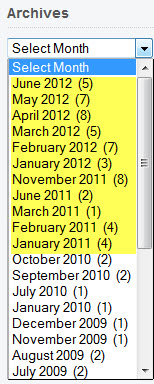 This post will focus on an elected area: Acquisition of New Skills. Something about this requirement makes me want to laugh. I wonder if anyone has trouble with assessing their own acquisition of new skills. Would anyone ever say, “nah, I didn’t learn anything this year”? Just seems funny to me. I’m actually having trouble thinking about how to assess all the things I’ve learned in the past year. I guess the best way to explain it is to just say: Read my blog. Yep, for years I’ve been blogging about all the cool things I’ve learned about teaching and learning with technology.
And although I don’t blog nearly as much as I want to, I’ve managed to post 54 times over the past two year.Mostly I blog about new technology tools I’ve learned about and how I might or have integrated them into my teaching. One of my most popular series on my blog is when I blogged about saying goodbye to Blackboard. This was before we adopted Canvas. I’d had enough and figured out a way to teach all of my online classes in a WordPress blog. I blogged about the challenges and of course to benefits of taking that leap. Part 2 of that series was my 2nd most viewed post: Saying Goodbye to Blackboard Part II – Student Blogs & Privacy – 6,488 views.
I read extensively about teaching and learning with technology and follow numerous blogs online. My RSS feedreader gets used often on my phone, tablet, laptop and desktop computers. I love the Google Reader gives you stats. Check this out.
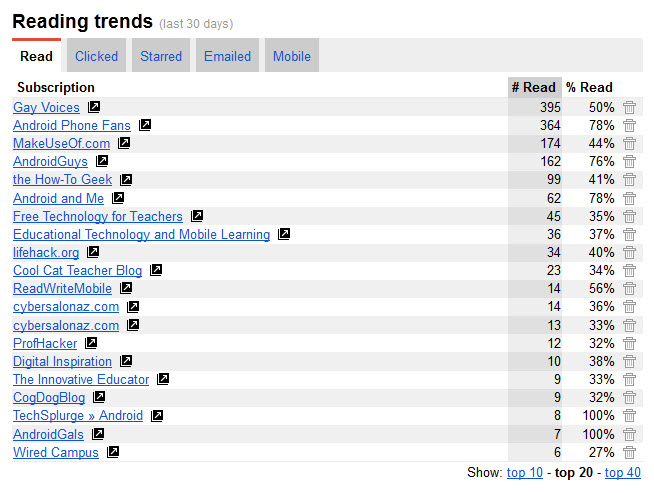
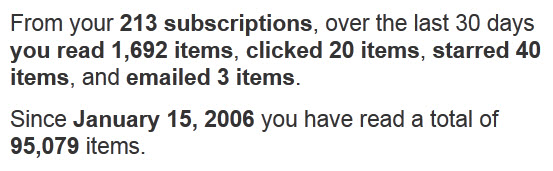 Now I’d say that is some reading. So what have I learned? I read mostly about Android, mobile learning, educational technology, and geek stuff. Below are my reading trends from the past 30 days. All but the first is related to my profession and interests in technology.
Take a look around the blog and I’m sure you’ll learn something. I post my weekly Diigo finds here as well. Essentially what that means is when I read some very interesting things or find great technology tools online, I bookmark them in Diigo and then post the best stuff here. It is continuous learning at it’s best with the system I’ve designed for myself. And the best part is it all works on my phone too, so I can take my learning with me where ever I go. Nice.
FEP: Self Assessment of Professional Development – Conferences & CyberSalon
In addition to an assessment of these “3 REQUIRED AREAS” (RFP Section 3.5.3.1.) , “AT LEAST TWO ELECTED AREAS” (RFP Section 3.5.3.2.), and other “RELATED AREAS” (REP Section 3.5.3.3.) may also be selected by the faculty member to review, in order to bring into better focus their full professional involvements at the college or within the District.
This post will focus on an elected area: professional development, which Maricopa provides plenty of opportunities for, both inside and out the district. I make it a habit to attend at least two conferences each year. This year I attended InstructureCon in Park City, Utah. This conference was a great venue for learning more about the new LMS Maricopa has adopted. Many other Maricopians were in attendance and it was nice to talk to them about how their implementations were going and to see their great presentations on how they are using Canvas. It was also nice to be able to ask questions of the Instructure team for trouble spots I’ve experienced with Canvas so far. I attended many sessions, including Hack Night. But the most eye-opening experience from the conference was learning about LTI’s and how we can add tools to Canvas using them. LTI is Learning Tools Interoperability (LTI) and they allow remote tools and content to be integrated into a Learning Management System (LMS). For instance, I learned that I could add WordPress blogs into my Canvas class using a LTI. Canvas has a list of current LTI integrations that you can explore for more added functionality.
 The biggest professional development for me has always been my interactions with like minded individuals within the district and out. A few years back Shelley Rodrigo started a Maricopa professional development group called CyberSalon. We call it a grass roots professional development and several of us have presented about it at national conferences. Laura Ballard and I did a poster session at the Sloan C conference a few years back. Cheryl Colan from RIO designed the poster and Shelley conducted the survey.
Here is a quote that summarizes what CyberSalon is for one member.
“It’s a casual environment that is more conducive to sharing ideas with everyone instead of the information being delivered by one presenter. It’s a little like speed dating….at face-to-face meetings I can hop around the room chatting with everyone getting specific answers to my questions. I also like the group as professional development because knowledge and ideas are being shared by people in the trenches of teaching and not a presenter that gets paid for speaking to educators.”
I learned so much from the 80+ members of CyberSalon over the years. The way it works is we meet up once a month on a more social level and discuss all things related to teaching and learning with technology. Some of the meetups are theme based. We had one on Canvas and another on VoiceThread this year. We’ve also covered WordPress and gaming, but mostly the meetups are just free flowing – discuss whatever is on your mind. When we’re not meeting, some of us are blogging about technology on the CyberSalonAZ blog site, as well as our own blogs. And the meat of the group is the Google group where we share resources and ask questions of each other.
Since Shelley, the group founder, has moved on from teaching in Maricopa, several of us have stepped up to “manage” the group and keep things rolling.
FEP: Self Assessment of Asst. Department Chair Responsibilities
In addition to an assessment of the “3 REQUIRED AREAS” (RFP Section 3.5.3.1.) , “AT LEAST TWO ELECTED AREAS” (RFP Section 3.5.3.2.), and other “RELATED AREAS” (REP Section 3.5.3.3.) may also be selected by the faculty member to review, in order to bring into better focus their full professional involvements at the college or within the District. Examples include program coordination, research projects, department/division chair responsibilities, student activities-advising/mentoring, professional involvement in the community, professional growth, involvement/projects, professional interaction with colleagues, etc.
In this post I will focus on department/division chair responsibilities. First, I am not a department chair, nor do I ever want to be one. I’m thankful to have a great chair to work under, and somehow I ended up being an assistant chair along the way. In my roll as the eCourses coordinator for the English department, I started out being in charge of further developing the online program in our department. I watch enrollments and makes suggestions for adding additional online courses if all of sections fill up. In order to do this, we have to qualified adjuncts available and ready. I help faculty get trained and to develop both online and hybrid courses. I’m also responsible for mentoring and evaluating new online faculty. This past semester we decided to open it up a bit and get more adjuncts trained in teaching online. I’ve been working with 8 adjuncts and several full-time faculty on developing new online and hybrid classes. Our growth has been tremendous.
English Department eCourses Growth Over the Last 3 years. Fall 2009 – Total of 12 online courses – Don’t have the break down.
This Spring 2012 – 38 total online courses in the department
Writing Courses
- 2 CRW170/CRW270 (Creative Writing)
- 4 Developmental Ed Modules (1 credit each)
- 8 ENG101 (Freshman Comp I)
- 1 – 8 week
- 1 – 12 week late start
- 12 ENG102 (Freshman Comp II
- 1 – 8 week
- 1 – 12 week late start
- 1 ENG111 (Technical Writing)
- 2 ESL
ENH: English Humanities/Literature Courses
- 2 ENH110 ( Intro to Lit)
- 1 ENH242 (American Lit)
- 1 ENH285 (Contemporary Women Writers)
- 3 ENH291 (Children’s Lit)
- 1 ENH295 (Banned Books)
- 1 ENH235 (Gothic Lit)
Considering that we offer around 440 sections each semester this is roughly 8%. We’re at 10% with our hybrid courses added in.
We’ve added 5 more online ENG101 for this fall and 5 more ENG102’s for Spring 2013, although we’re starting to see a drop off in enrollment, so our growth might be slowed moving forward. However, if we need to continue to grow, we now have adjuncts trained and ready to teach new online courses.
As eCourses Coordinator I’m now responsible for book orders for all online courses, so I’ve done that for that last two semesters. I’ve been meeting on my own time this summer to work with faculty who are finishing up course development on classes they will teach this fall. And I’ve scheduled for technology training for our text book online supplement – Connect Composition 2.0. We had a session last week with 15 people in attendance. We have another training scheduled for July.
FEP: Self Examination of Committee Participation – Slam Dunk!
To complete an FEP each faculty member must engage in a self-examination of “THREE REQUIRED AREAS”:
- GOVERNANCE AND/OR COMMITTEE PARTICIPATION AT THE COLLEGE AND/OR DISTRICT LEVELS
I currently serve as an assistant chair/eCourses coordinator for the English Department and work with faculty to create and/or improve their online/hybrid courses. I also evaluate all online/hybrid instructors and courses in the English department. I serve on the eCourse Committee and the CTLE Advisory Committee on campus. As part of the duties of the CTLE Advisory committee, I’m currently serving on a hiring committee to hire a Coordinator of Technology Training for the CTLE. Yes, we are still working on this – round 2. This group was also responsible for writing the job description for the new Faculty Lead for the CTLE and hiring the new Instructional Designer.
For eCourses, I volunteered to help create an eCourses Student Orientation (what was I thinking?) and am slowing working on that. We have a few modules already completed and hope to finish before fall. I helped Leah with the HLC paperwork for our online courses in the fall. I also helped by doing 3 online course reviews for the eGCC Gold Reviews.
I serve on a district committee, Academic Technology Alliance (ATA), that meets monthly in addition to smaller subcommittee activities. The main objective of the ATA is to identify and strategically implement effective learning technologies across all ten colleges in the district. I’m on a subcommittee looking at Reusable Learning Object creation tools, like Softchalk (interactive lesson authoring). The ATA submitted three proposals to ITTGC that were accepted and are in process of going out for RFP.
- Plagiarism Detection Tools (RFP process) recently presented to IITGC by ATA for RFP Funding has been approved.
- Interactive Lessons Authoring (RFP process) recently presented to IITGC by ATA for RFP Funding has been approved.
- HD Standards and Services (RFP process) recently presented to IITGC by ITLC for RFP Funding has been approved.
We were told that our committee was the most active and accomplished the most in the first year of this new IT governance model. It feels good to know that we are doing things to help make teaching and learning better for all faculty in the district.
I have the motto of “no meetings where nothing gets done.” I hate to sit around and listen to people to talk about doing stuff and doing nothing. I chose my committee assignments based on the knowledge that these committees do and don’t just talk. I was present for most of the meetings this semester and actually looked forward to going.
FEP: Self Examination of Teaching – ENG101/ENG102 Course Shells/Guides
To complete an FEP each faculty member must engage in a self-examination of “THREE REQUIRED AREAS”:
- TEACHING (OR OTHER PRIMARY DUTIES). For example, instructional or service delivery, content expertise, classroom or program management, instruction/program design.
This is the first of my three required areas for self-examination. Teaching. I will focus on content expertise. I’ve been teaching online for 14 years, so I’ve become somewhat of an expert in online course development. One of the good things about becoming involved with online teaching is it brings me back to the basics of teaching and learning and course design. What I mean by that is that so much scrutiny has been placed on online teaching and online classes. For instance, in order to teach online, one must be properly trained in Quality Matters standards and have a course review after their course is developed. This is not expected of any other instructor teaching at the college, only online instructors. As a result I’ve been able to master instructional design and online course development. One of the projects I’ve been working on since transferring over to GCC is building ENG101 and ENG102 course shells and teaching guides for adjunct instructors. The course shells have been a work in progress for several years now, but the gist of the project is to make available full courses for adjuncts to use as guides for teaching their own courses.
The course shells and teaching guides include full syllabi and full course modules with included assignments, readings, class activities, and quizzes. The course shells can be used in whole or in part depending on what the instructors need. When I designed the courses, I used my knowledge of instructional design for online, hybrid and face-to-face instruction, so no matter what the mode an instructor may teach, the course shells will be a good place to start.
One key concept of designing good online classes is modularization. You can read more about how A Modular Course Design Benefits Online Instructors and Students. I figured if it works for online, why wouldn’t it work for face-to-face classes as well. So I designed the course shells using modules that incorporate the same types of components in each course module. Faculty could then pick and choose which modules they wanted to use. Modules were developed around a 3-4 week period. In the ENG101 each module included 2 assignments, handbook activity (grammar practice), journal posts, discussion forum, an essay and a module quiz. Have a look at the complete modules overview page for ENG101. Below is a screenshot of Module II from the fall semester.
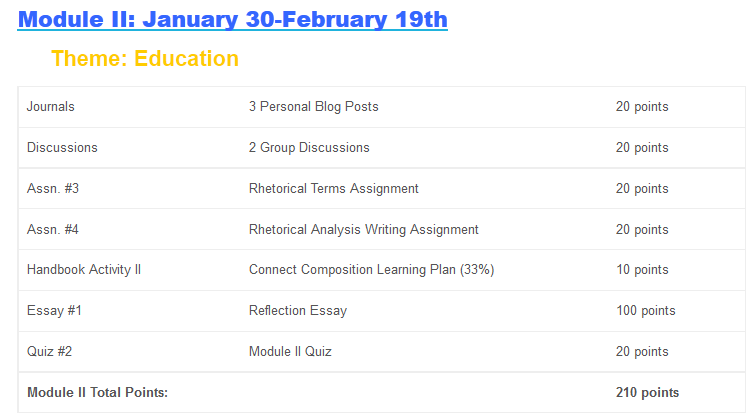
The course shells were designed in Word documents as well as placed in a Blackboard course shell and shared with both full-time and adjunct faculty in the department. So if someone wanted to use the course management system if was already set up and organized for him/her. We currently have 22 people who have access to the Blackboard course shell. This semester I spend considerable time converting the Bb course shells over to Canvas. ENG102 is ready, but I’m still working on ENG101. With the move to Canvas, I’ve been working on rewriting/writing better learning objectives for both courses.
MIL Retreat 2012
 So this past week we had a two day retreat for new and old MIL fellows. On the first day we got to spend the day getting to know each other and learning the ins and outs from the exiting fellows. The first thing I noticed was the comradeship of the five exiting fellows. They lost one fellow at the start, so they only had five. These five individuals sounded like they truly had a good time and supported each other throughout the process. They shared their experiences, as well as their research projects, and I felt overall very comfortable with the expectations of the program. I left excited to get started on my own project.
For those of you who are not familiar, “The Maricopa Institute for Learning (MIL) is a fellowship for residential faculty in any discipline who are interested in examining significant issues in their teaching fields and contributing to the scholarship of teaching and learning through classroom research projects. Its secondary purpose is to create a community of scholars that will engage in conversations about the scholarship of teaching and learning.” The program is weighted heavily in the Scholarship of Teaching and Learning (SoTL), hence my stolen logo from some other institution.
The best part of the retreat this past week was getting to know my own group of fellows. We are a very diverse group coming from only 3 of the 10 colleges: GCC (me), MCC (3) and EMCC (2). Only two of our disciplines overlap; myself and Annie both teach English, but Annie’s project dips into dev ed and accelerated learning and my project deals with online learning and is not discipline specific. It will be relevant to all courses that can be taught online. It was really interesting to hear what each participant is planning to study during our time together. I know I will learn as much about their projects as I will about my own. I’m excited to get started.
So our first steps, as recommended by the out going fellows, are to get the project sured up so I can get my IRB submitted and hopefully approved by the end of summer. And secondly get the literature review completed during the summer when you have fewer obligations to get in the way. I think this is good advice, and I plan to do just that. I’m not intimidated by the IRB process. For one, I’ve been through this all before with my doctoral dissertation, and I stressed enough then to cover any I may have now. Also my current project is pretty basic. I’m not doing anything outside of normal teaching practices. I’m just asking to collect the results of how my students do with these practices. It should go through easily (knock on wood).
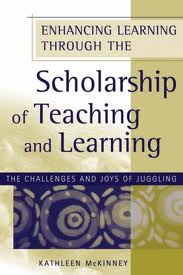 We were also given some summer reading, so I’ll probably start with that. We’re reading Enhancing Learning Through the Scholarship of Teaching and Learning by Kathleen McKinney (left) and Blueprint for Learning: Constructing College Courses to Facilitate, Assess, and Document learning by Laurie Richlin. I’m going to enjoy this next week of break before I jump in full force June 1st. I’ll be back then to report out on how it’s going.