

ENG102 Research Assignment – Odyssey I: Locating Sources on the Internet
Back in January I blogged about the research assignments I use in my ENG102 course. I call these assignments Odyssey assignments to put emphasis on their importance. You can read more about that in the first assignment below. I thought it would be a nice addition to share the assignments too. So if you haven’t done so, revisit the first post and then come back and view the assignments.
We do this assignment in Week 3, and prior to doing the assignments students are instructed to view the following lessons:
Assignment #3 – Odyssey I: Locating Sources on the Internet
Instructional Objectives
In this assignment students will:
- further developed their ability to read critically,
- refine strategies of academic research, including searching the internet using two different strategies and compiling a list of sources (working bibliography),
- and refine paraphrasing skills.
Writing Paraphrases
View the Lesson 3.2: Writing Paraphrases. Paraphrasing a source involves restating the ideas and information from a passage in your own words. When you paraphrase, you need to use different words and sentence structure to ensure that your paraphrase isn’t too close to the original passage.
To paraphrase a passage, you should follow four steps. In this demonstration, we follow the progress of student writer Aaron Batty and see how he paraphrased a passage from a source he used in his research writing project: “Taiwan Asks U.S. to Let It Obtain Top-Flight Arms,” an article first published in the New York Times.
What is an Odyssey?
An Odyssey, famous for a Greek epic poem (attributed to Homer) describing the journey of Odysseus after the fall of Troy, is a long wandering and eventful journey. This is a perfect description for writing a research paper. It’s not something that we put together in a day. Writing a research paper is a long wandering and eventful journey, so some of the key journeys in this process have been labeled odysseys to indicate their importance. All Odyssey assignments are required and must be submitted in order for your final paper to be accepted. No skipping Odysseys. They are mandatory.
Odyssey I – Locating Sources on the Internet
 Take a look in the Internet Public Library (http://www.ipl.org/) or Infomine (http://infomine.ucr.edu/ ). Look for your subject as you would for any other purpose, and keep your eyes open for sites that look like directories. Read through the descriptions. Sometimes these resources are identified as “Directories, “Virtual Libraries,” or “Gateway Pages.” These two directories are small enough that you can read through the results of a search.
- In About.com (http://www.about.com/#!/browse-categories/), search by topic and look for pages that are described as “101” or “guides” or a “directory.” About.com is written by “Guides” who, themselves, often are experts in the sections they manage. Sometimes they write excellent overviews of a topic.
- Also take a look at Yahoo’s list of Academic Libraries by using the link listed below:
A. Search one of these popular subject-directory search tools listed above. Locate a web page that deals with your approved research topic. Record the name of the search engine used.
B. Search by clicking your way through the subject directory. Do not type key words into a search box.
C. Record the URL (web address: http://) for the page you found on your paper.
D. Cut & Paste one paragraph (3-4 sentences) of information from any part of the web page on to your paper. Label itOriginal.
E. Paraphrase the chosen information. Type your paraphrase under the original and label it Paraphrase.
F. Add this webpage citation and a brief summary to your Diigo bookmarks AND to Bibme bibliographer (working bibliography).
II. Conduct a Second Internet Search.
In a meta-search engine, you submit keywords in its search box, and it transmits your search simultaneously to several individual search engines and their databases of web pages. Within a few seconds, you get back results from all the search engines queried. Meta-search engines do not own a database of Web pages; they send your search terms to the databases maintained by search engine companies. Choose one of the meta-search engines from the list:
Meta-search Engines:
- Yippy! – http://search.yippy.com/ Yippy is a metasearch engine: it queries multiple search engines and combines the results to be displayed as a group, or cloud, on one screen.
- Dogpile – http://dogpile.com/ Powered by Metasearch technology, Dogpile returns all the best results from leading search engines including Google, Yahoo!, Bing and Ask, so you find what you’re looking for faster.
- SurfWax – http://surfwax.com/A better than average set of search engines. Can mix with educational, US Government tools, and news sources, or many other categories.
- MetaCrawler – http://www.metacrawler.com/ MetaCrawler.com utilizes metasearch technology to compile results from many of the Web’s major search properties, delivering more relevant and comprehensive results every time you search.
- Do not use Yahoo!, Google or Bing! for this assignment. We are trying new things.
A. Search one of these popular text-directory meta-search tools. Type in your subject/topic words in the space provided. Locate a web page that deals with your research topic.
B. Record the name of the search engine used.
C. Record the URL (address: http://) for the page.
D. Cut & Paste one paragraph (3-4 sentences) of information from any part of the web page on to your paper. Label it Original.
E. Paraphrase the chosen information. Type it under the original and label it Paraphrase.
F. Add this webpage citation and a summary to your Diigo bookmarks AND to Bibme bibliographer (working bibliography).
III. Working Bibliography:
Record all bibliography information available from both websites, including the URL, in your Bibme project using the MLA style of documentation. You will need an author, website name, date, URL and date of access. If you can’t find these items, consider whether you should even use a site with no such information. Review evaluating sources information. Cut & paste a copy of your working bibliography into this assignment. Label it Working Bibliography.
IV. Submit in Canvas
Example Assignment
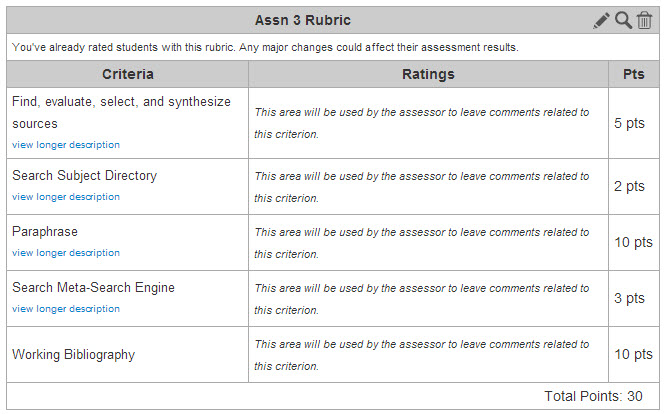
Rubric

Assignment Odyssey 1: Locating Sources on the Internet by Dr. Alisa Cooper is licensed under a Creative Commons Attribution-NonCommercial-ShareAlike 3.0 Unported License.
Based on a work at https://freshmancomp.com.

Comments are closed.